
Valuable Waste Management (VWM)
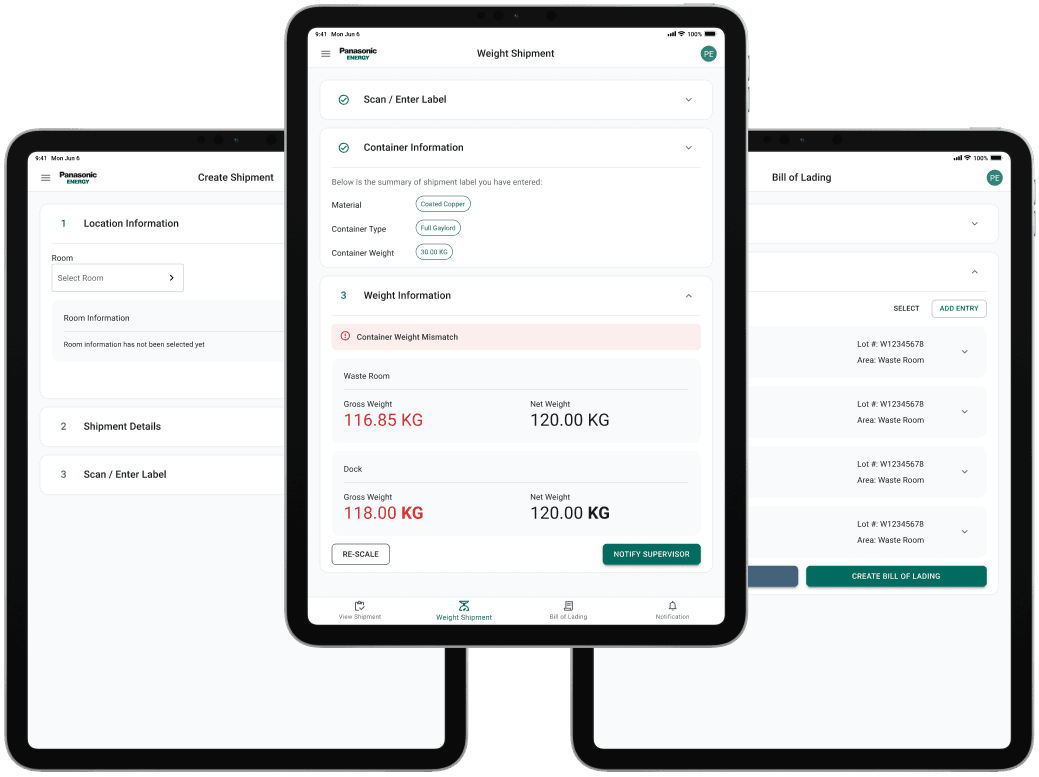
is an internal tool for tracking, processing, and shipping valuable manufacturing waste. It centralizes shipment creation, weight verification, discrepancy handling, and vendor coordination into a single workflow for production and dock teams.
My Role
Click to expand for more details
Sole Product Designer
As the sole product designer, I led the end-to-end design of an internal waste management system used by production, dock, and accounting teams. I collaborated closely with MES and engineering teams to define workflow architecture, streamline operational processes, and design scalable interfaces for shipment creation, verification, and discrepancy handling.
Skills
The system is currently deployed and being monitored in production environments. Future work includes refining edge-case handling, monitoring operational usage patterns, and iterating on workflows based on ongoing feedback from production and dock teams.
Cross Functional Teams Collaboration
I collaborated closely with software and data engineering teams to define workflow architecture, simplify operational processes, and design scalable interfaces for real-time discrepancy tracking and review.
Problem
Valuable waste operations were spread across multiple tools and manual processes, making it difficult to maintain a consistent workflow across teams. Operators had to switch between systems, processes are different by teams, and on-boarding new operators required significant process knowledge.
From a business perspective, there was also limited standardization and visibility across the shipment lifecycle, creating an opportunity to unify the workflow into a single system.
Solution Vision
Design a centralized workflow that standardized how production and dock teams tracked valuable waste, with built-in safeguards for handling operational issues in real time.
Project Constraints
Click to expand for more details
Multi-Role Complexity
Production, dock, and admin teams each required different workflows and permissions within the same system. The challenge was designing role-specific experiences while maintaining consistency across the platform.
iPad-Only Workflow
Stakeholders required the system to run exclusively on iPad, shaping the interface around touch interaction, portability, and limited screen space.
Discover
To better understand the process from user perspective, I have conducted:
Observations (Field Study)
Operators switched between multiple tools and physical locations to complete a single task
Label creation, weight verification, and shipment preparation were disconnected workflows
Issue resolution relied on Microsoft Teams communication between operators and supervisors
Interviews
Operators expressed frustration with the existing workflow
Supervisors had limited visibility into valuable waste progress
Repeated manual data entry created unnecessary effort
Task Analysis
A single task required movement across locations, tools, and manual approval processes.
System fragmentation created frequent interruptions and inconsistent execution.

Key Insights
Through discovery stage, I identified key insights.
⛓️💥
Daily operations were spread across disconnected tools
Production and dock teams switched between multiple systems and spreadsheets to complete a single workflow, creating missed steps and inconsistent data between teams.
🚨
Critical decisions occurred outside the primary workflow
Approvals and issue resolution were managed through Microsoft Teams instead of the primary system, causing critical decisions to happen outside the operational flow.
📋
Operational processes lacked standardization
Overflow bins, weight mismatches, and damaged labels were handled differently across teams, making the workflow inconsistent and difficult to audit.
Collaboration
VWM made possible through close collaboration across stakeholders, software and data engineering teams.

Feature Priority Alignment
I worked with MES team, alongside software and data engineers, through weekly syncs to prioritize scope and reconcile regional differences in quote detail requirements.

Collaborative Design Process
Stayed in close contact with software and data engineers using Teams throughout implementation, reviewing progress and refining interactions to keep the design consistent.
Design Principles
The key insights and collaborating with cross-functional teams led to core design principles that guided design decisions throughout the project.
1
Unify the Workflow
Replace fragmented tools and spreadsheets with a single system shared across production, dock, and finance teams.
2
Create Clear Operational Ownership
Design role-specific workflows so each team records and validates its own data before handing work downstream.
3
Reduce Training Overhead
Create workflows that are simple enough for teams across locations and technical backgrounds to learn quickly with minimal training.
4
Handle Exceptions Within the Workflow
Support edge cases like weight mismatches, overflowing bins, and approvals directly inside the system instead of relying on external tools.
User Roles
Click to expand for more details
Waste Room Operator
Records daily waste activity and serves as the primary source of operational data entry.
Waste Room Supervisor
Oversees shipment creation and approves weight discrepancies before materials move downstream.
Dock Operator
Supports shipment preparation, weighing, and physical material handling.
Dock Supervisor
Manages receiving, weighing, conflict resolution, and vendor shipment workflows.
Design Process
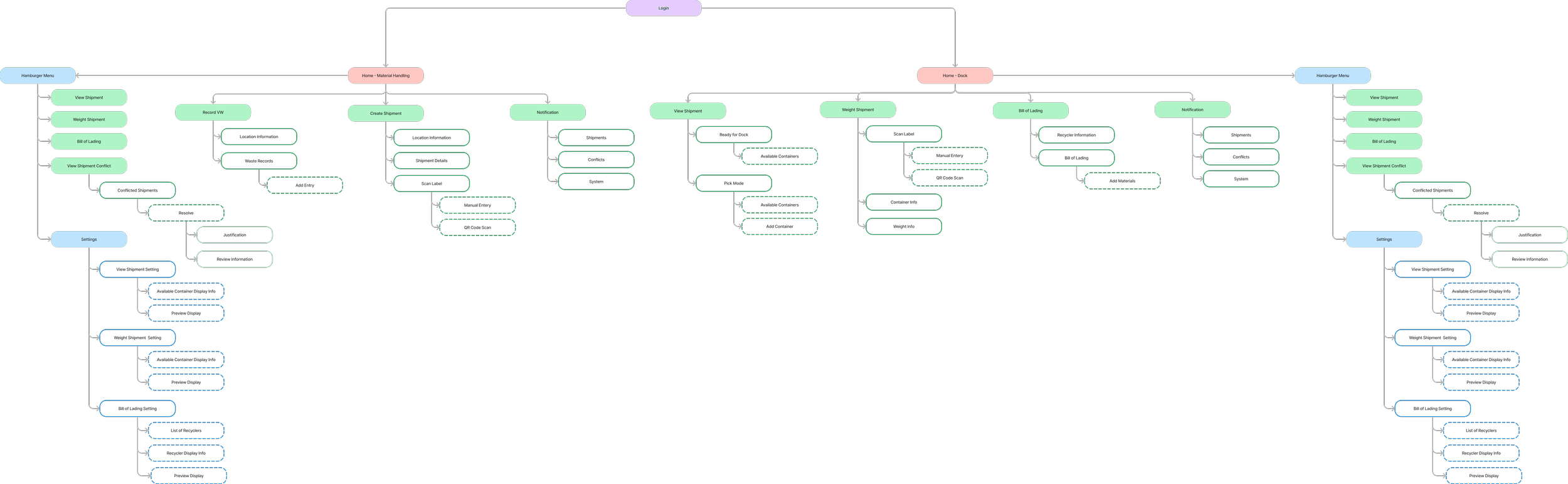
Information Architecture
Organized around three core workflows: waste room, dock, and vendor shipping. Defining the structure early aligned engineering teams on system scope and role responsibilities before interface design began.
Draggable
Userflows
Mapped the counting workflow end-to-end to identify unnecessary steps and role handoffs. This helped simplify the process, reduce operational friction, and define the minimum number of screens required.

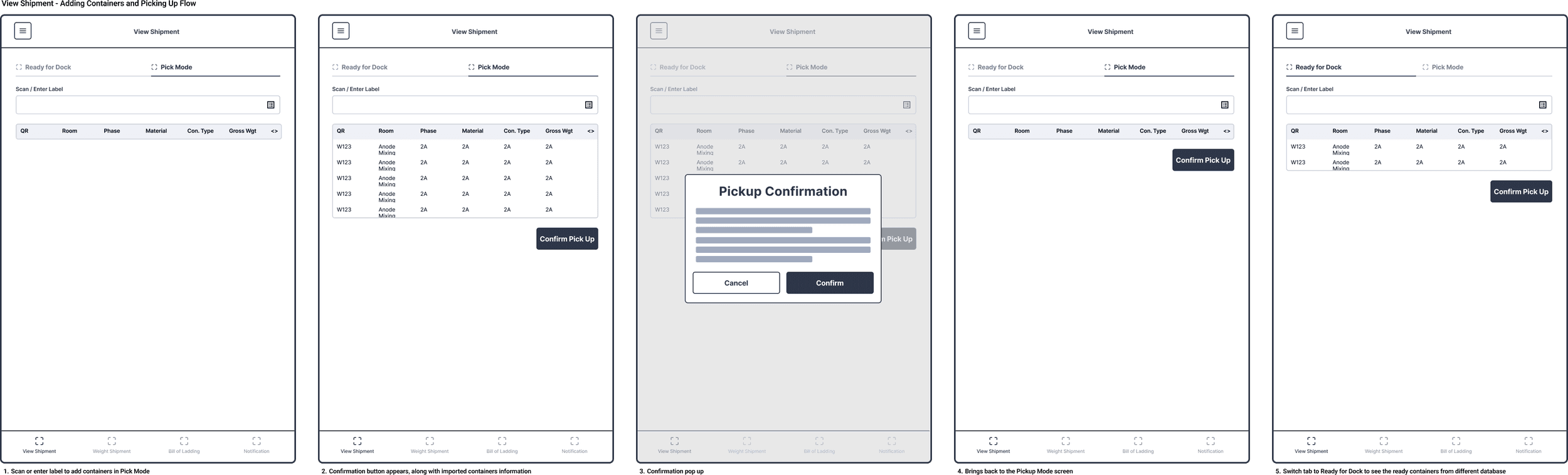
Wireframes
Created wireframes to validate the workflow structure and user journey before investing in high-fidelity UI. Partnered with cross-functional teams to confirm requirements, discuss technical feasibility, and iterate on key features early in the design process.
Draggable
Iteration Methods
Click to expand for more details
Prototype Testing
- Improved layout clarity and task sequencing reduced operator confusion. - Increased visibility across steps reduced unnecessary backtracking. - Structured information grouping improved readability in data-heavy workflows.
Time-on-Task Comparison
- Operators struggled to scan and prioritize large amounts of information within limited screen space. - The dual-column layout created confusion around task order during active workflows.
Stakeholder Feedback Loops
- Validated workflow completeness across production, dock, and approval stages. - Clarified ownership and handoffs between operational roles. - Ensured the system aligned with real-world operational constraints and processes.
Userflows
Before
Repeated loops and validation steps created unnecessary navigation throughout the workflow.

After
Reduced decision points and eliminated repeated loops, shortening the path from start to submission.
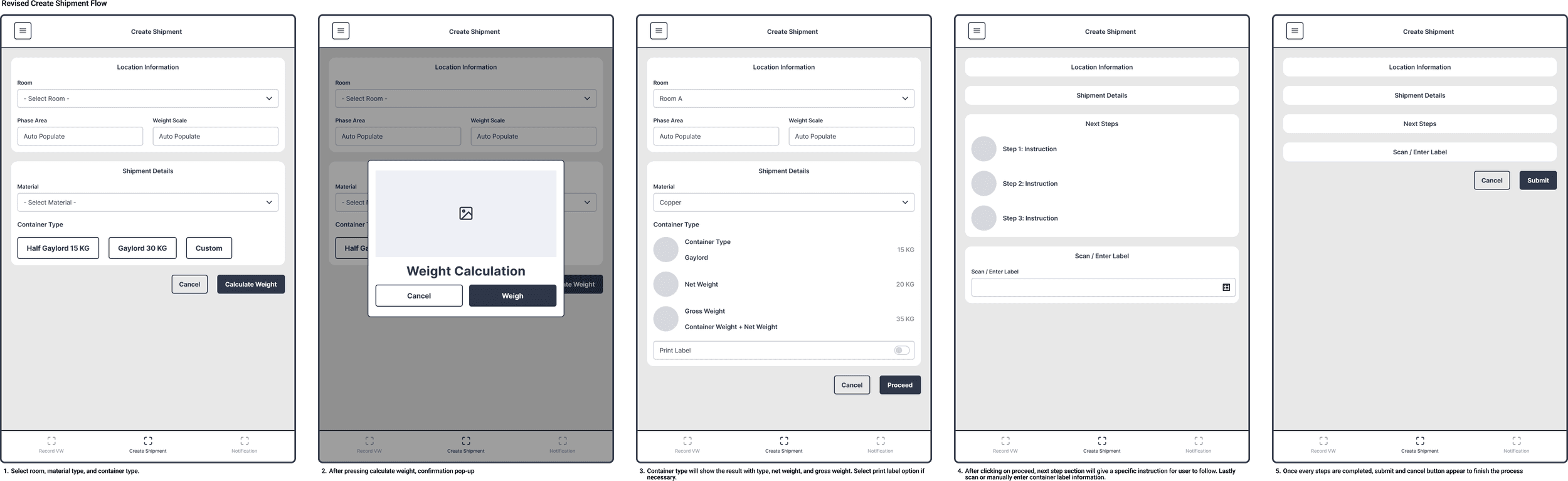
Wireframes
Before
Two separate pages, each with unused screen real estate and no visibility into previous inputs.
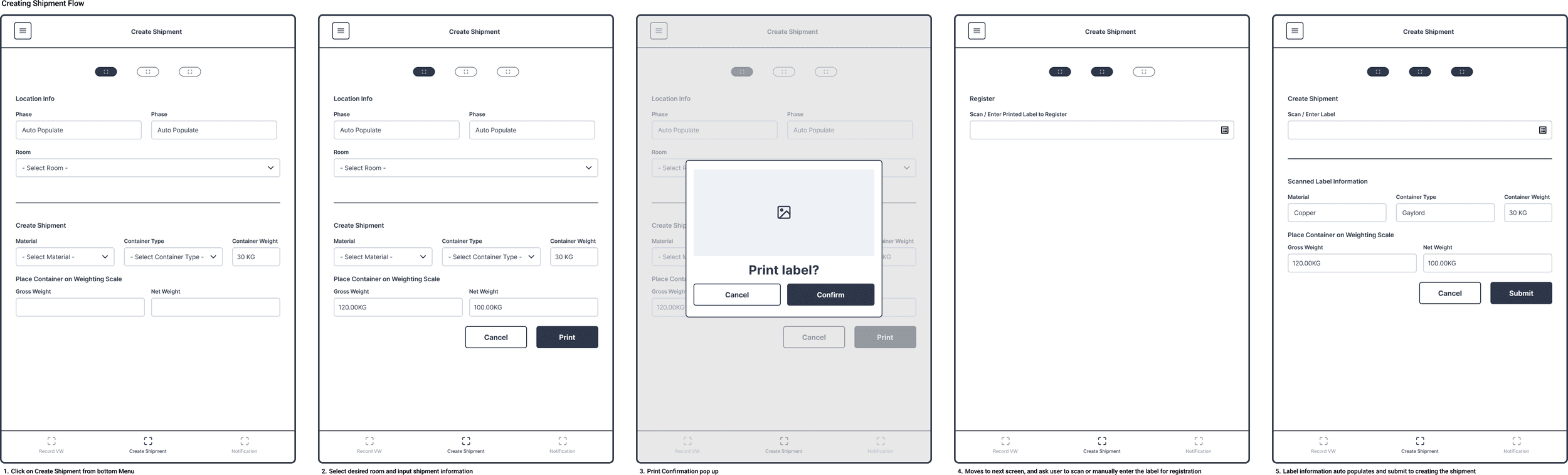
After
Consolidated into one continuous scroll, with all inputs visible and inline validation throughout.
Iteration Outcomes
Steps Reduced
11
steps
9
steps
2 steps reduced
Consolidated redundant interactions to reduce task completion effort without removing critical operational steps.
Removed Redundant Workflow
Eliminated intermediate confirmation and instruction screens that interrupted the shipment creation flow, allowing operators to move between actions with fewer interruptions.
Improved Data Validation for Accuracy
Introduced validation at key points in the workflow to catch errors during entry instead of after submission.
Final Solutions
Streamlined Shipment Creation
Operators can move from material selection to label generation and scanning in a single streamlined flow. Pre-set options reduce manual input and speed up task completion.
Strengthened Shipment Verification
Container information is automatically retrieved through label scanning or manual entry, while discrepancy checks help identify weight mismatches before shipment approval.
Improved Batch Processing
Batch scanning and editing reduced repetitive manual entry, allowing operators to process multiple waste containers more efficiently.
Reflections
Converting a disconnected workflow into one unified system was the primary challenge
The hardest part was not designing screens, but understanding a process distributed across physical locations, disconnected tools, and multiple operational teams. Defining the workflow clearly upfront made the rest of the system possible.
Working outside my usual domain improved cross-functional collaboration
VWM introduced operational and SCADA systems I had not previously worked with. Close collaboration with engineers and stakeholders became essential for validating workflows and making informed design decisions throughout the project.
Standardizing workflows improved day-to-day operations
Replacing fragmented processes with guided workflows reduced onboarding complexity and improved operational consistency across teams. After launch, operators and stakeholders reported smoother daily execution and fewer workflow interruptions.
Next Steps
The system is currently deployed and being monitored in production environments. Future work includes refining edge-case handling, monitoring operational usage patterns, and iterating on workflows based on ongoing feedback from production and dock teams.
Back to Work