
PENA Design System
I built and scaled a design system based on MUI to standardize UI patterns across internal enterprise products, partnering with engineering to turn reusable components and design guidelines into a shared system through Figma and Storybook.

Problem
When I joined, there was no shared design foundation across our internal products. No design system for a company with this scale.
As each application evolved independently, teams were repeatedly solving the same design problems, creating inconsistent experiences and increasing maintenance overhead.
Without a common system, scaling design across products became increasingly difficult.
Opportunity
Click to expand for more details
Departments recognized the need for standardization
Conversations with department leaders confirmed I wasn't alone in seeing this. Teams across the org recognized the need for consistency, but no one was actively driving it.
Opportunity to establish a scalable design foundation
The Smart Factory investment created room to build something scalable, a foundation that could support not just current tools, but future ones.
Aligned with the Smart Factory initiative
When I raised the issue with my manager, then Head of Digital Transformation, we aligned on standardization as a priority within the company's Smart Factory initiative.
No one was driving the initiative
With the company investing heavily in Smart Factory modernization, this was the moment to establish a scalable design foundation that could support future products.
Constraints
These constraints shaped how the system needed to be built.
1
No Shared Design Standards
2
Limited Software Engineering Support
3
Active Projects Could Not Be Delayed
4
First Design System at Organizational Scale
Strategy
One of the biggest decisions was whether to build a design system from scratch or leverage an existing foundation.
Option 1: Build our own design system
Complete ownership of design language
Tailored to organizational needs
Significant design and engineering investment
Limited resources and ongoing project commitments
Option 2: Leverage Material UI
Faster implementation and adoption
Reduced design and engineering effort
Built on a mature, industry-proven foundation
Component library that had already solved many common design and engineering challenges
Decision
Building a system from scratch would have required significant design and engineering investment that didn't align with our resources or timeline.
Material UI let us establish consistency quickly on a proven foundation, so I could focus effort where it created the most value: defining workflow patterns and solving the operational problems specific to our organization.
Customization 1
We didn't have defined brand colors, let alone a secondary palette or semantic color system. Customizing Material UI's theme was the first step, giving every component a consistent color foundation to build on. We also checked colors against WCAG AA contrast requirements for text and interactive states.
Primary Branding Color
primary.main
#006B5F
Primary buttons, links, selected controls
primary.dark
#004F42
Active/pressed states, stronger emphasis
primary.light
#007B6E
Hover states, lighter emphasis, backgrounds
Secondary Branding Color
secondary.main
#446279
Secondary buttons, accents, selected elements
secondary.dark
#2F4454
Pressed/active states, stronger emphasis
secondary.light
#698193
Hover/lighter emphasis, subtle accents
System Color
system.success.main
#2E7D32
Successful action, completed, valid
system.warning.main
#EF6C00
Potential problem, caution
system.error.main
#D32F2F
Error, destructive action, invalid
system.info.main
#0288D1
Informational message, neutral guidance
Customization 2
With the branding foundation in place, I adapted Material UI's core components to match our visual system and the workflows our internal tools relied on, documenting each with the states and variants teams needed to build consistently.
Components


Draggable
Adoption
As the sole designer, I couldn’t support every implementation. I documented each component in Storybook with its props, states, and usage guidelines, allowing engineers to implement them independently. This helped the system scale across multiple teams without relying on me for every implementation.
Component Reference (Anatomy)


Draggable
Component Reference (States)
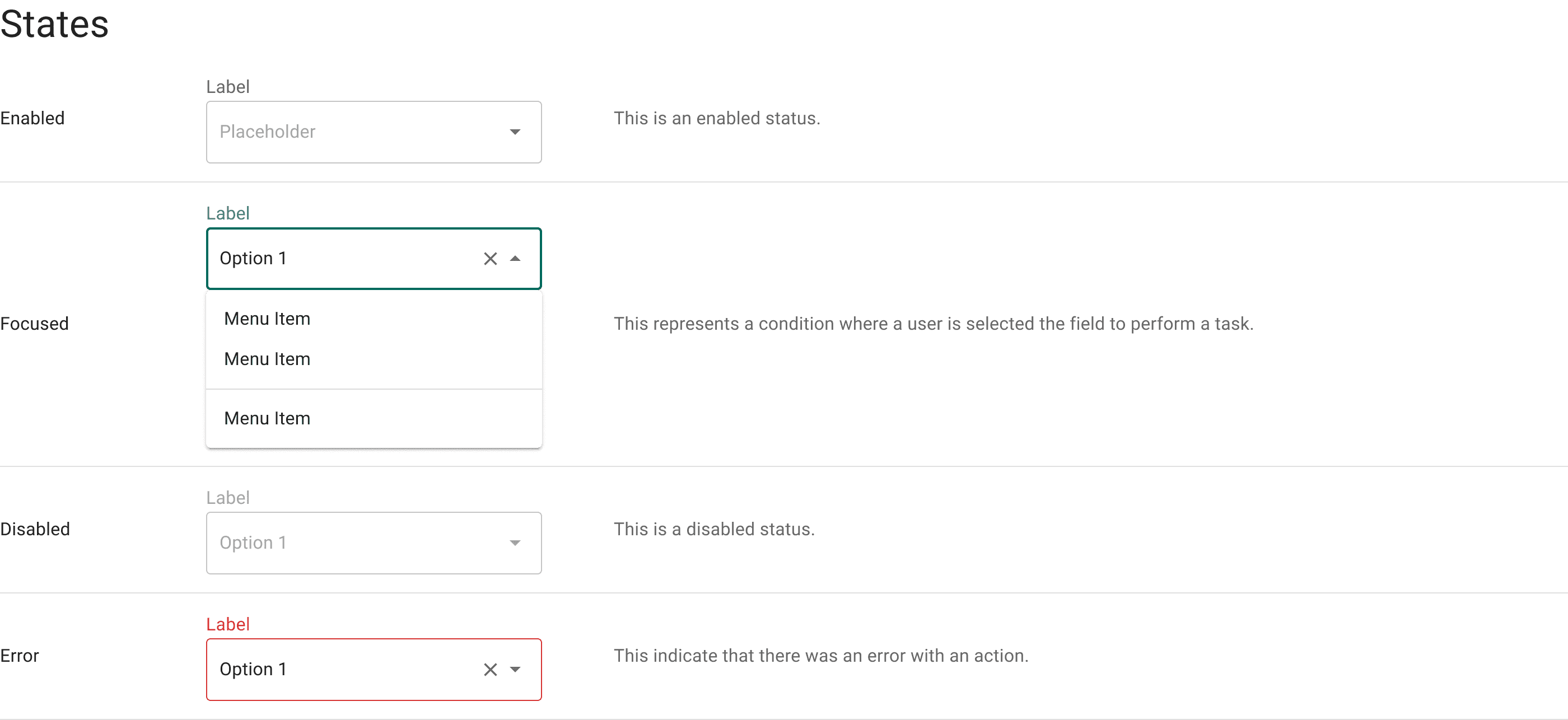

Draggable
Usage Guidelines


Draggable
Result
The design system shipped across multiple internal applications, each built for different operational needs but sharing the same components, patterns, and visual language.
For Desktop


Draggable
For Mobile / Tablet


Draggable
What happened next
Transition into Palantir System
Four years in, the organization began shifting select workflows to Palantir Foundry as part of a broader platform decision made at the VP level. The design system continued to serve the tools that remained outside that shift, while my focus shifted toward establishing consistency within the Palantir platform itself.
Back to Work