
Sourcing Portal
is an internal quote management system that helps procurement teams request, compare, and track supplier quotes in one centralized dashboard, supporting faster and more visible sourcing decisions.



Draggable
My Role
Click to expand for more details
Sole Product Designer
As the sole product designer, I led the end to end design of an internal quote management tool used by procurement teams and Japan team.
Cross Functional Teams Collaboration
I collaborated closely with software and data engineering teams to define workflow architecture, simplify operational processes, and design scalable interfaces for real-time discrepancy tracking and review.
Problem
Sourcing teams rely on customized Word documents to request quotes from suppliers, resulting in a slow, limited visibility, and making it difficult to compare supplier pricing side by side.
Solution Vision
Design a centralized quote management system that tracks requested quotes, enables side-by-side supplier quote comparisons, and supports faster, more informed sourcing decisions.
Project Constraints
Click to expand for more details
Fit Existing Procurement Workflows
The solution needed to integrate with existing procurement processes without disrupting how sourcing teams and suppliers currently operate.
Multi-Language Support
The application needed to support multiple languages while maintaining a consistent user experience across NA and Japan sourcing teams.
Discover
To better understand the process from user perspective, I have conducted:
Interviews in English and Japanese
The quote creation workflow was mostly the same, but each request required different part and supplier information depending on the region.
Employees expressed frustration with repeatedly entering the similar information across multiple quote requests.
Difficult to compare supplier quotes across multiple PDF files, making side-by-side comparison slow and inefficient.
Employees struggled to keep track of quote requests, often searching through multiple folders and files to find the latest or previous quotes.
User Pain Points
Click to expand for more details
Quote Creation
- Repeatedly entering the same supplier and part information across quote requests. - Creating a new quote request from scratch instead of reusing previous data. - Manually checking for missing or incorrect information before sending requests. - Spending too much time filling out repetitive Word document.
Quote Management
- Difficult to keep track of quote requests and their current status. - Hard to locate previous quotes stored across multiple folders. - Unclear which supplier has responded and which quotes are still pending.
Quote Comparison
- Difficult to compare supplier quotes because they are spread across multiple PDF files. - Switching between several quote PDFs makes side-by-side comparison slow. - Important differences in pricing, lead times, or specifications are easy to overlook. - Manually comparing quotes increases the risk of selecting the wrong supplier.
Decision Making
- Supplier selection requires reviewing information from multiple sources. - Historical supplier performance is not readily available during evaluation. - Decision rationale is often undocumented, making future reviews difficult. - Choosing the best supplier involves balancing cost, delivery, and quality manually.
Visibility & Tracking
- No single place to monitor supplier responses and deadlines. - Users frequently search through files to find the latest quote. - Limited visibility into which quotes require immediate attention.
Task Analysis
Quotes are created manually following the templates.
Employees manually open each PDFs and compare side-by-side.
Workflow varied by employees region that Japanese quotes required additional details


Key Insights
Through discovery stage, I identified 4 key insights.
🔁
Repetitive quote creation reduced productivity
Employees repeatedly entered similar supplier and part information for each quote request, resulting in unnecessary manual effort.
📋
Quotes selection relied on manual evaluation
Selecting the best supplier required gathering information from multiple sources and manually weighing factors such as unit price, quantity, and quality, slowing quote choosing decisions.
🔎
Limited visibility delayed sourcing decisions
Users had no centralized way to identify which suppliers responded, which quotes were still pending, or which requests required immediate attention, leading to unnecessary follow-ups.
🌏
Regional workflows required flexibility
While the sourcing workflow was largely standardized, regional differences, such as additional fields required for Japan side inquiries.
Collaboration
Sourcing RFQ made possible through close collaboration across stakeholders, software and data engineering teams.

Feature Priority Alignment
I worked with the sourcing team across North America and Japan, alongside software and data engineers, through weekly syncs to prioritize scope and reconcile regional differences in quote detail requirements.

Collaborative Design Process
Stayed in close contact with software and data engineers using Teams throughout implementation, reviewing progress and refining interactions to keep the design consistent.

North America and Japan Teams Alignment
Partnered with sourcing teams in North America and Japan to gather differing quote requirements, balancing a shared dashboard experience with the flexibility each region needed.
Design Principles
The key insights and collaborating with cross-functional teams led to core design principles that guided design decisions throughout the project.
1
Reduce repetitive work through reusable workflows
Quote creation followed a predictable process, but employees repeatedly entered similar information for every request. The experience should reduce repetitive work while preserving the flexibility needed for varying supplier and part requirements.
2
Centralize supplier comparison
Comparing supplier quotes across multiple quote PDFs slowed procurement decisions. Bringing quote information into one workspace supports faster and more accurate evaluations.
3
Improve visibility across the sourcing process
Procurement teams lacked a centralized view of requested quotes, quote status, and pending actions. Increasing visibility helps teams stay organized and respond more quickly.
4
Support flexible workflows without increasing complexity
While the sourcing process remained consistent, regional requirements introduced variations in required information. The interface should adapt to different scenarios while maintaining a familiar workflow.
User Roles
Click to expand for more details
Procurement Employees
Primary user responsible for creating quote requests, managing supplier quotes, comparing quotes notifying suppliers throughout the sourcing process.
Supervisors
Reviews and approves sourcing decisions, and manages list of suppliers and parts information.
Procurement Team - Japan Side
Supports regional sourcing activities for Japan by managing supplier quotes, comparing quotes, and collaborating with global procurement teams.
Data X Team
Manage system integrations, configurations, and data reliability across sourcing portal.
Design Process
Information Architecture
The system was organized mainly around RFQ (request for quotes) workflow. Defining the structure early helped align software and data teams on the project scope before design began.

Draggable
Userflows
Mapped the counting workflow end-to-end to identify unnecessary steps and role handoffs. This helped simplify the process, reduce operational friction, and define the minimum number of screens required.


Draggable
Wireframes
Created wireframes to validate the workflow structure and user journey before investing in high-fidelity UI. Partnered with cross-functional teams to confirm requirements, discuss technical feasibility, and iterate on key features early in the design process.


Draggable
Iteration Methods
Click to expand for more details
Usability Testing
- Employees preferred separate fields for Notes and Observations instead of a single combined notes section. - Additional fields were required to accommodate regional requirements during quote creation. - Testing highlighted the need for improved column spacing to enhance data table readability.
Time-on-Task Comparison
Completion time was measured during usability testing to assess workflow efficiency. - Requiring manual entry for every part increased completion time and repetitive work. - Searchable, reusable parts and supplier information reduced manual input and accelerated quote creation. - A simplified comparison table helped employees compare supplier quotes more efficiently.
Stakeholder Feedback Loops
Following stakeholder feedback from the Japan procurement team, additional input fields were introduced to support regional requirements while keeping the overall quote creation workflow consistent.
Userflows
Before
Repeated loops and validation steps created unnecessary navigation throughout the workflow.

After
Reduced decision points and eliminated unnecessary loops, creating a more direct path from start to submission. The streamlined workflow became even more efficient for repeat tasks by automatically retaining previously selected suppliers and part information.

Design Iteration
Side Panels - Before -> After
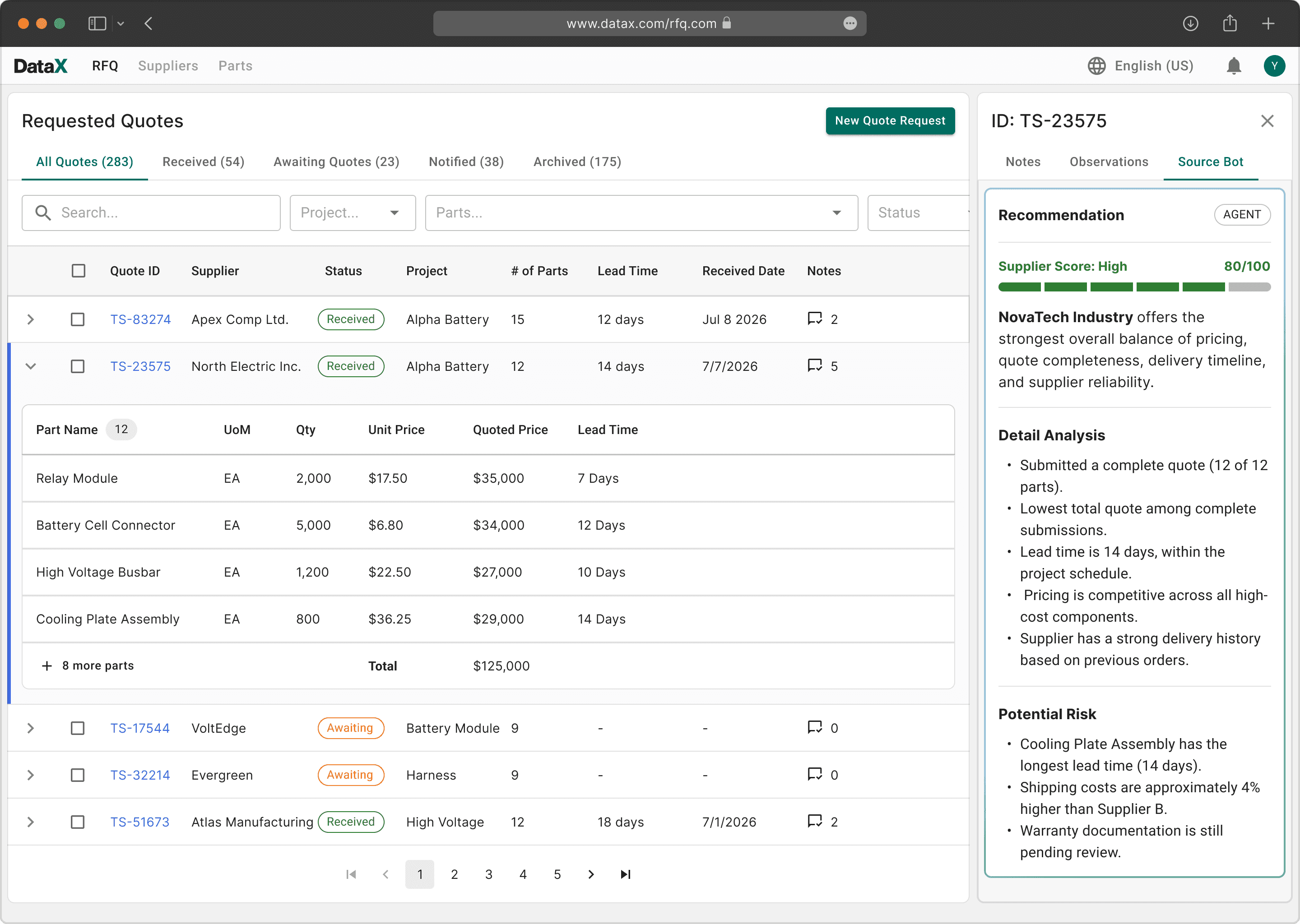
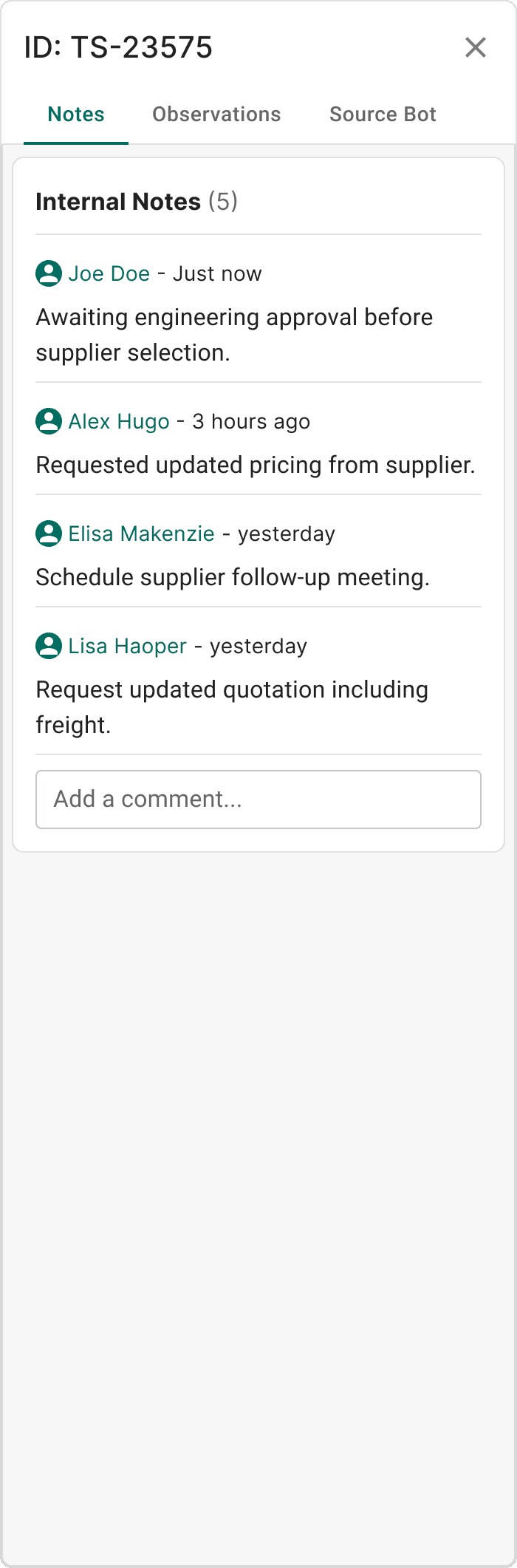
Organized side panel content into dedicated tabs, making information easier to navigate and reducing visual clutter.

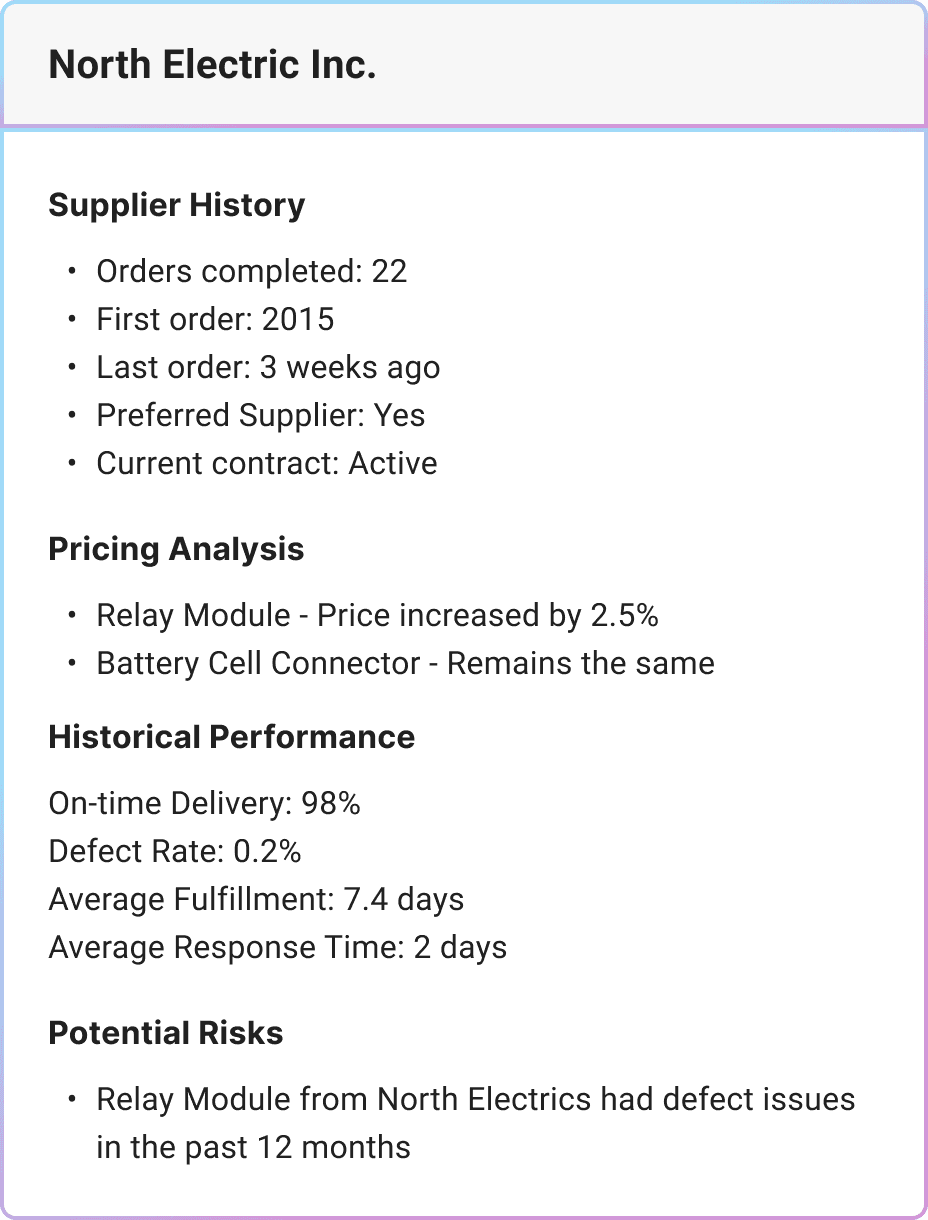
Source Bot Summary - Before -> After
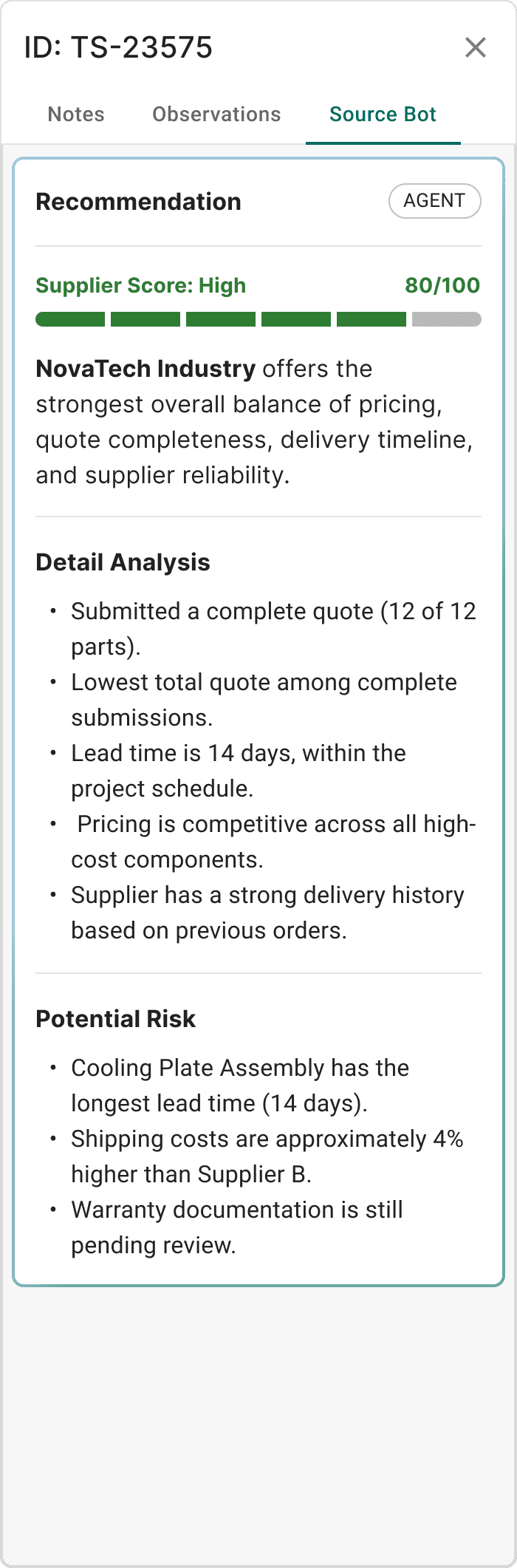
Enhanced visual hierarchy and content organization, reducing cognitive effort when reviewing supplier information.

Iteration Outcomes
Reduced Repetitive Data Entry
Part and supplier information was reused throughout the workflow, minimizing duplicate input and reducing the time required to create new quote requests.
Faster Supplier Comparison
Suppliers comparison table and AI summaries enabled sourcing teams to evaluate supplier quotes side by side, making pricing and trade-off analysis quicker and more consistent.
Improved Quotes Visibility
Quote statuses, supplier notes, and detailed information were consolidated into a single dashboard, giving employees a clearer view of status.
Design with AI
Rapid Prototyping using Figma Make
Using Figma Make, I transformed high-fidelity mockups into interactive prototypes, allowing stakeholders to experience key workflows before development began.
This enabled teams to validate interactions, gather feedback earlier, and reduce unnecessary design iterations before finalizing the product experience
AI-Assisted Design Review
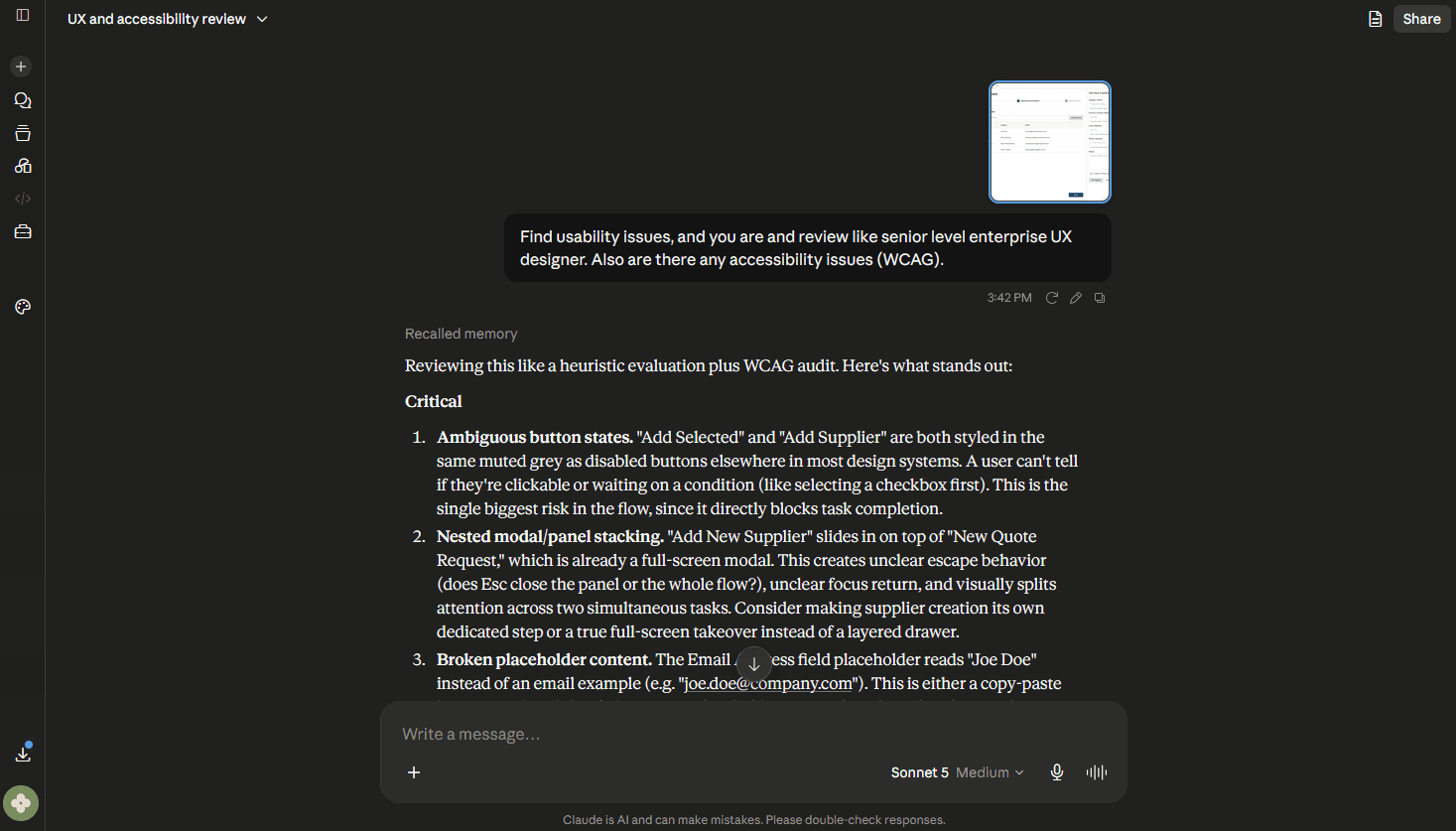
I used Claude AI to quickly review my designs for accessibility concerns, usability issues, and potential gaps before presenting them to the team.
AI helped identify issues early and streamline my workflow, but I treated its feedback as suggestions rather than final decisions. Every recommendation was evaluated and validated using design principles, product requirements, and user needs.
Final Solutions - New Quote Request
Faster Quote Creation
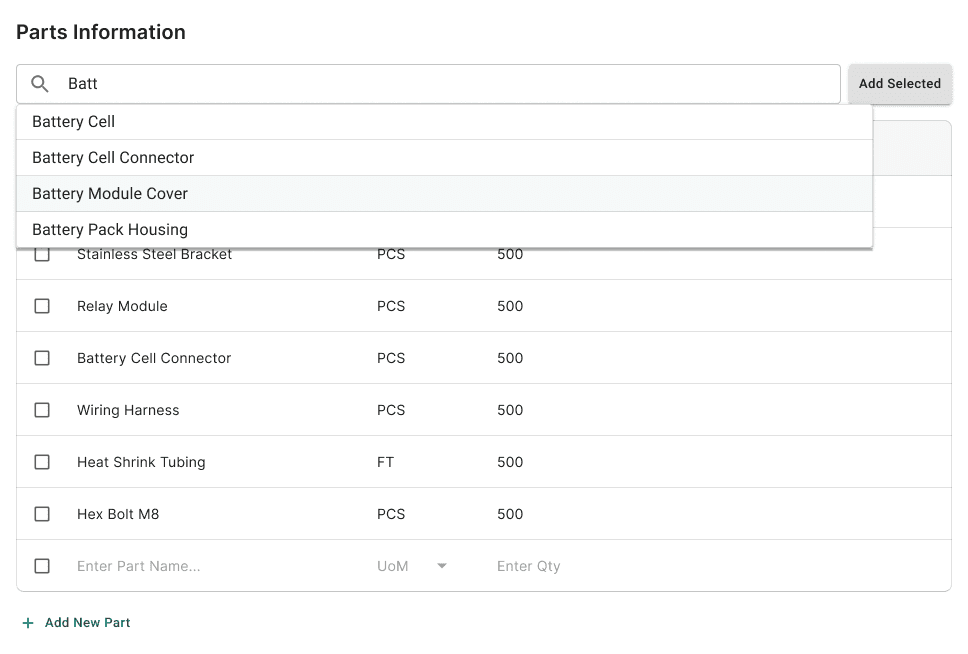
A streamlined workflow that enables employees to create supplier quote requests for multiple parts within a single experience. Previously entered part and supplier information is automatically reused, reducing repetitive data entry and improving efficiency for recurring requests.
End

Drag up for next UI steps
Agent Assisted Review
Before submission, our source bot agent validates quote requests by identifying missing information, flagging unusual inputs, and providing contextual recommendations based on historical sourcing data, helping employees catch issues early and make more informed decisions.

Reusable Part & Supplier Information
Previously entered parts are automatically saved and re-used through search for future quote requests. Unit of measure is preserved to reduce repetitive input while allowing users to enter a new quantity for each request.
Regional Workflow Support
Extended the quote creation process to support Japanese procurement teams with localized language and additional required fields unique to regional manufacturing workflows.

Final Solutions - Quotes Comparison & Notify
Find and Compare Quotes Faster
Filter quotes by status, project, parts, and other criteria to quickly narrow results before comparing supplier pricing and details, helping sourcing teams make faster, more informed decisions.
End


Click and drag up to view the next step
Information at a Glance
A detailed side panel provides collaboration notes, supplier observations, and source bot agent recommendations in one place, reducing context switching and supporting faster decision-making.

Smarter Supplier Comparison
A centralized comparison space enables sourcing teams to evaluate supplier quotes side by side while source bot agent highlights the recommended supplier based on pricing and historical performance. Additional AI summary tab provides key insights to accelerate supplier selection.
End


Drag up for next UI steps